Tech Corner
Install HBase in a snap! A simple step-by-step guide
This 5-step guide will help you to install HBase on your Mac in just 5 minutes. Use it to store large volumes of time-series data with minimum effort!

Most Linux distributions use the systems as a system and service manager. In this tutorial, I will show how to set up SOLR as a service.
Solr is highly reliable, scalable and fault tolerant, Open-source REST-API based search engine developed under Apache Software Foundation umbrella, mature with a wide user base.
Solr is a full-text search, ready to deploy engine that can handle large volumes of text-centric data.
The purpose of Apache Solr is to index and search large amounts of text/web content and give relevant content based on search query.
Solr is also very modular. You can exchange or add functionality just by including your custom code in the form of a jar file and slightly changing the configuration.
Ps. Chatbots are also a great way to help your website visitors find the content that they're looking for. Get started with an Engati Chatbot today!
Zookeeper is a configuration-management application that comes prepackaged with Solr. It works well in the local environment, but as you increase the traffic or number of nodes, the prepackaged Zookeeper falls short of delivering proper support to your Solr cluster.
So in the production environment Zookeeper should be installed separately.
sudo useradd -m -p $(perl -e 'print crypt($ARGV[0], "password")' solr solr
sudo su - solr
wget https://archive.apache.org/dist/lucene/solr/7.3.0/solr-7.3.0.tgz
tar xzf solr-7.3.0.tgz
I am setting up Zookeeper and Solr both in the same machine.
vi /etc/hostszokeeper.app.local 127.0.0.1
solr.app.local 127.0.0.1
If you’re using a ZooKeeper instance that is shared by other systems, it’s recommended to isolate the SolrCloud znode tree using ZooKeeper’s chroot support. For instance, to ensure all znodes created by SolrCloud are stored under /solr
/home/solr/solr-7.3.0/bin/solr zk mkroot /solr -z zookeeper.app.local:2181
Create a systemd service file usingvi /etc/systemd/system/solr.service
[Unit]
Description=Apache SOLR
After=syslog.target network.target remote-fs.target nss-lookup.target[Service]
User=solr
Type=forking
PIDFile=/home/solr/solr-7.3.0/bin/solr-8983.pid
ExecStart=/home/solr/solr-7.3.0/bin/solr start -c -h solr.app.local -p 8983 -z zookeeper.app.local:2181/solr -noprompt
ExecStop=/home/solr/solr-7.3.0/bin/solr stop
Restart=on-abnormal[Install]
WantedBy=multi-user.target
sudo systemctl daemon-reload
sudo systemctl start solr
sudo systemctl status solr
Now go to the browser and hit http://solr.app.local:8983 to access admin UI.
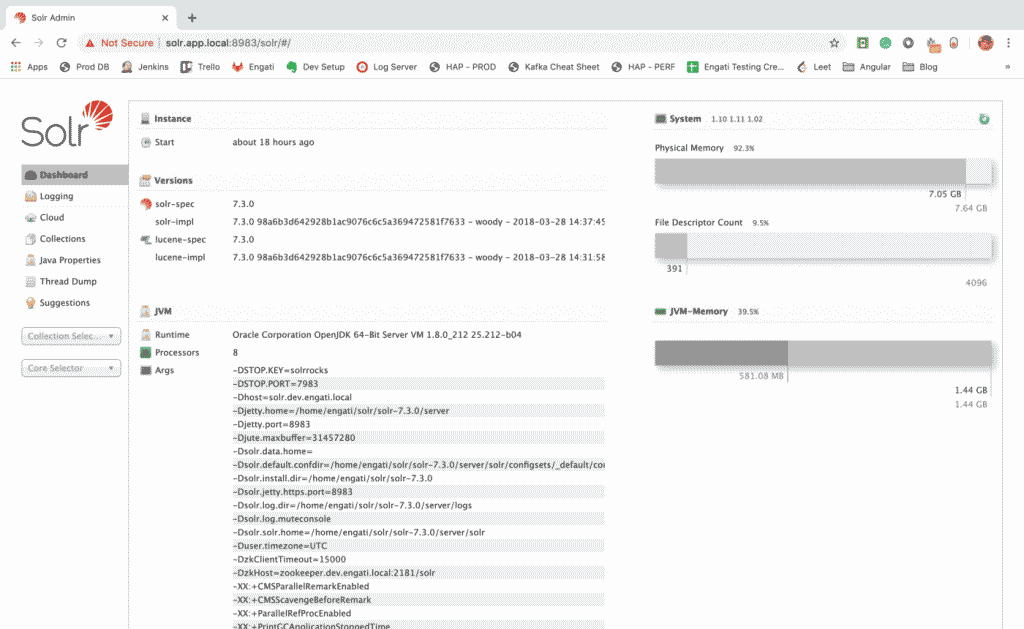
Hope this helped you get a good idea of how you should set up Solr as a system service. Happy searching!
When you combine search with chatbot automation, you can deliver well-rounded experiences to your customers at all times. Ready to explore?
Register with Engati to bring life to your customer interactions!
Solr stands for Shareable Online Learning Resources!
Solr gathers, stores and indexes documents from various sources and makes them searchable in real-time.

Tech Corner
This 5-step guide will help you to install HBase on your Mac in just 5 minutes. Use it to store large volumes of time-series data with minimum effort!

Tech Corner
Business Intelligence tools like Quicksight, Kibana & Apache Superset help companies analyze & present the data in an understandable & attractive manner.

Future of CX
Ever wonder what makes Apple and Amazon so insanely successful? Reducing the customer effort score is always the focus & that's what drives these big giants