Chatbot
How to Design Chatbot Conversational Flow with Examples (2024)
Learn from chatbot flowchart examples and discover how to design chatbot conversational flows that lead to more natural and engaging user interactions.
Dependency parsing involves exploring the dependencies between words in a sentence to gain an understanding of its grammatical structure. It breaks sentences into multiple components and works on the concept that there are direct links (or dependencies) between every linguistic unit in a sentence.
Relations between linguistic units or words are indicated with directed arcs in a typed dependency structure. Relationships between words are indicated by dependency tags.
When there are dependencies between two words, one word is the head while the other one is the dependent (or child). There are now 37 universal syntactic relations included in the Universal Dependency V2 taxonomy. In addition to these, a vast range of language-specific tags also exist.
Dependency parsing can identify the subjects and objects of a verb, while also showing you which words modify or describe the subject.
You could consider dependency parsing to be the process of listing every single word in a sentence as a node and linking them to their dependents, thereby defining the grammatical structure of that sentence.
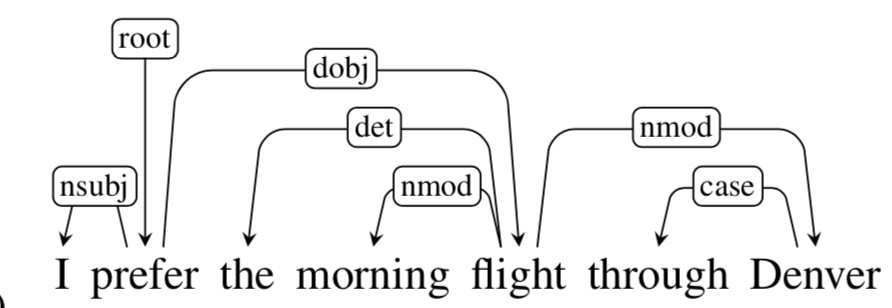
Dependency trees are directed graphs that follow three rules:
These rules work together to make sure that every word has just one head, that the
dependency structure is well connected, and that there is only one root node from which
a unique directed path connects each of the words in the sentence.
The Natural Language Toolkit (NLTK) package can be used for Dependency Parsing, which is a set of libraries and codes used during statistical Natural Language Processing (NLP) of human language.
There are several methods through which you can perform dependency parsing with the use of NLTK. Two of these techniques include:
Probabilistic, projective dependency parsers predict new sentences by making use of natural language data that is gathered from hand-parsed sentences. These parsers are known for making mistakes and they work with a limited collection of coaching information.
The Stanford NLP Group’s CoreNLP offers NLP tools in Java. You can make use of this Java Library along with NLTK to parse dependencies in Python. Thus parser supports a large number of languages, including, but not limited to English, Chinese, German, and Arabic.
You’d start by downloading the Stanford CoreNLP zip file and Stanford CoreNLP model jar file from the CoreNLP website.
You can run these three commands to download the required libraries and unzip the zip file.
wget https://nlp.stanford.edu/software/stanford-corenlp-4.2.2.zip
wget https://nlp.stanford.edu/software/stanford-corenlp-4.2.2-models-english.jar
unzip /content/stanford-core NLP-4.2.2.zip
After you download these libraries, you can import the StanfordDependencyParser from NLTK.
To visualize the dependency that CoreNLP generates, you can either extract a labeled and directed NetworkX Graph object using dependency.nx_graph() function or you could even generate a DOT definition in Graph Description Language using dependency.to_dot() function. The DOT definition can be visualized as a graph using GraphViz.
Here are two other ways to implement dependency parsing in Python:
You can make use of spaCy, an open-source Python library for Natural Language Processing, to implement dependency parsing.
To start, you’d want to install spaCy and load the language model that you need to use. The smallest English model available in spaCy is en_core_web_sm. This language model has a size of 12MB. You can check out other available models if you go through the spaCy English Models.
spaCy even offers you a built-in dependency visualizer known as a display that you can use to generate dependency graphs for sentences.
The Stanford NLP Group also developed Stanza. Stanza offers you a Neural Network NLP Pipeline that you can be customized, as well as and a Python wrapper over the Stanford CoreNLP package, which makes it easier to use the CoreNLP features without downloading the jar files.
You start by installing Stanza. Then you need to import Stanza and download the required language model. Here’s a list of the available language models that you can make use of.
Then you initialize the neural pipeline through the use of stanza.Pipeline() function. The first parameter is the language to use. Optional parameter processors can be passed which can be a dictionary or a comma-separated string to configure the processors to use in the pipeline.
You can access a list of all the processors on Pipeline and Processors. Some of the processors could need to be preceded by some other processor in the pipeline, otherwise, they will not function. As an example, the pos processor requires to tokenize and met processors, so you would have to make use of these two processors in the pipeline as well if you intend to use the pos processor.
Now, you pass your sentence through the pipeline and maintain all the results in the doc variable. If you print doc. sentences, you’ll notice a list for every one of the sentences that were passed through the pipeline. Every list contains the results of all token information and linguistic features.
You can then we can call the print_dependencies() function for all the sentences in the doc object. This function will print tuples with three values — the token, the index of the head, and the related nature.
Chatbot
Learn from chatbot flowchart examples and discover how to design chatbot conversational flows that lead to more natural and engaging user interactions.
Future of CX
Dr. Swapnil Dambe tells us about everything we need to keep in mind while trying to create sustainable making digital experience and innovation centers.
Drive to Reimagine
Streamline Your Business with Chatbot Automation - Say Goodbye to Repetitive Tasks! Learn Expert Tips for Creating Effective Chatbots Today.....................