Whatsapp Marketing
Create WhatsApp Bot for Free in 5 Mins With No Code (2025)
Learn how to create a WhatsApp bot in 5 minutes with easy steps. Discover WhatsApp integration tips, explore use cases & get a chatbot demo with free trail.
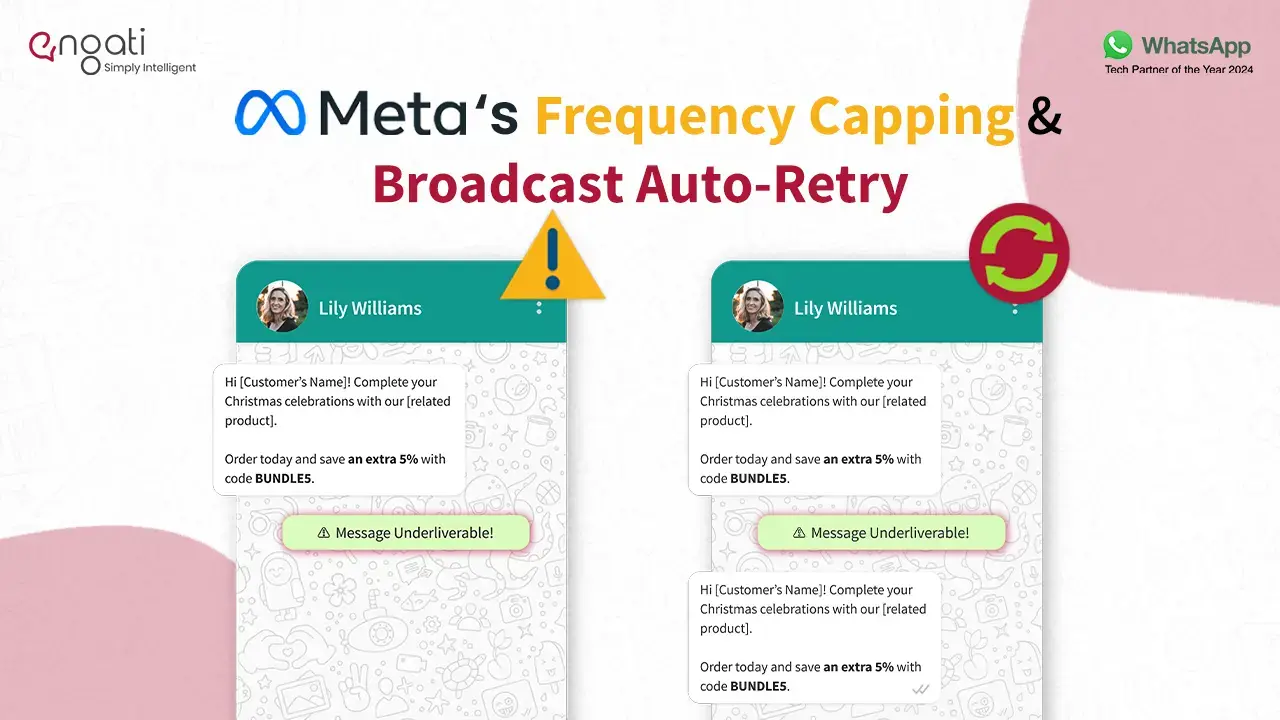
Don’t you love using WhatsApp for all your marketing campaigns? Nothing’s better than landing straight into your users' DMs for everything. However, as enticing as it may sound, Meta realized some brands might be exploiting this and spamming their users globally. To control this, it has come up with a new update, “Frequency Capping”. Starting May 23, 2024 per-user marketing template message limit will be rolled out across the globe..
Frequency Capping puts a limit on the number of marketing messages a user can receive from brands in a specific time frame.
Frequency Capping restricts promotional messages sent through approved WhatsApp Business templates. There's a limit on how many of these messages a user can see from all businesses in a certain period (think of it like a quota). This timeframe and the number of messages are constantly adjusted by Meta to optimize the user experience.
Let’s understand this with an example. In your life-time till date you might have knowingly and unknowingly given your WhatsApp number to various brands. Let’s say during the festive season, 50 different brands decide to send promotional messages at the same time or in the same week. Wouldn’t it get slightly irritating? To solve this problem and make the user experience better, META came up with frequency capping. Now, in the same scenario where 50 brands are sending you messages, META will only send a certain number of messages to your whatsapp during a certain period of time. For instance, it can be 15 messages out of those 50 in the period of 5 days.
Now, you might be wondering what the number of messages per user receives in a particular time-frame. Well, META has not disclosed these numbers and they keep updating these numbers on a regular basis to keep the user experience favourable.
Meta is also responsible for making sure WhatsApp users do not feel overwhelmed by all the messages coming in. This restriction should help businesses have more meaningful conversations with their users on WhatsApp. This can lead to increased engagement, better CTRs and also conversions.
Frequency Capping only applies to promotional messages transmitted through WhatsApp Business API. These messages will NOT be affected:
Businesses might face some marketing messages failing to reach their target audience. Don't jump to conclusions though! These failed deliveries could be due to other reasons besides Frequency Capping, as you'll still get standard error codes due to Frequency Capping, remember other factors can still affect deliverability.
If you see this error code: 131049, that means the message has failed to deliver due to frequency capping (Meta chose not to deliver).
Meta’s intentions behind this update are to make sure users do not get overwhelmed or feel spammed by businesses on WhatsApp.
One of the prominent ways to get through this is resend all your failed messages again after a while. But, there is a problem with this method, with a large broadcast list doing this manually is not just time consuming but also very hectic.
With Engati’s Broadcast Auto-retry feature this can be done seamlessly without any manual inference and more efficiently.
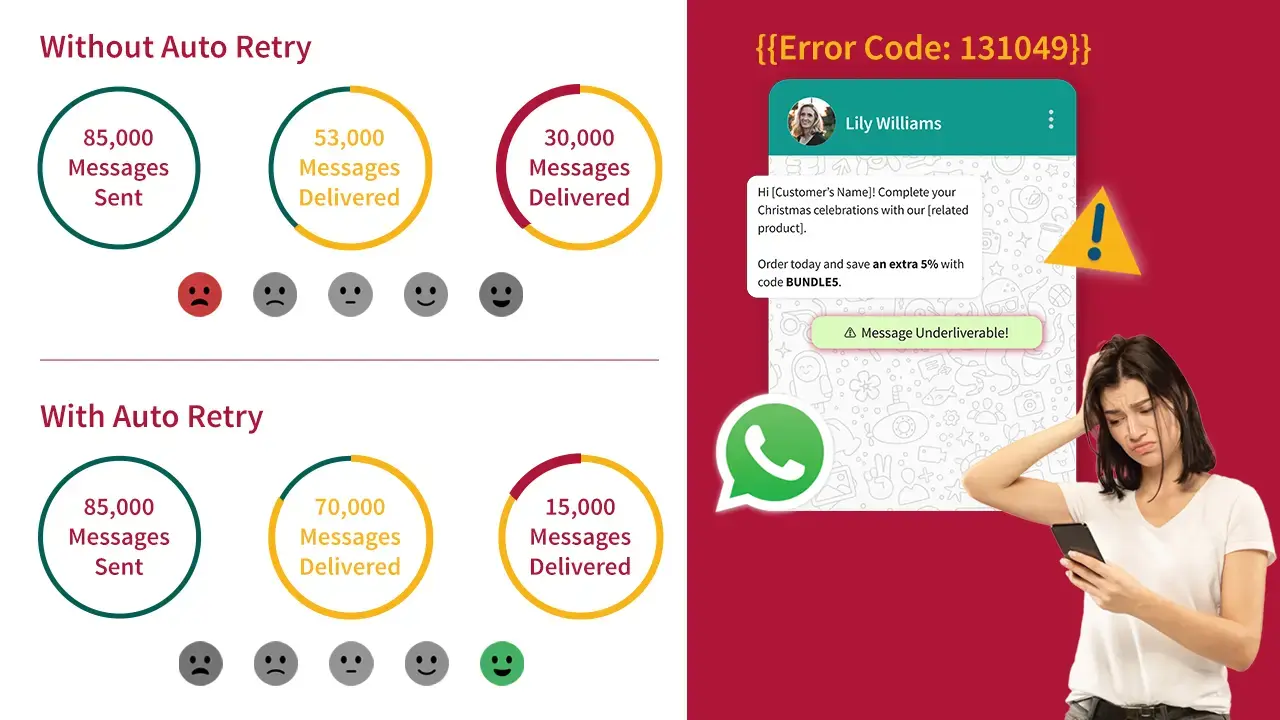
Wondering what Broadcast Auto-Retry is. Continue reading for the answer.
Broadcast Auto-Retry is a feature of Engati that a user can enable while they schedule or send their broadcast. Once the feature is enabled, the platform automatically resends the failed broadcast messages due to frequency capping error, to the users.
Here is how this works. While you enable the feature, you will select the interval you want to keep before it sends the message again. Also, you will get the number of times you can auto-retry making it one of the best ways to overcome frequency capping and significantly increase the delivery rates.
WhatsApp broadcasts are a powerful tool, but they come with their own set of challenges:
Setting up WhatsApp Broadcast Auto-Retry with Engati is like cutting butter with a hot knife. Just a few clicks and you are done. Let me take you through this:
First things first, you need to have an account with Engati. If you haven't used Engati yet, you can try it for free. All you need to do is sign up here!
Here is all you need to do to enable Broadcast Auto-Retry with Engati.
Step 1: Set-up your broadcast campaign.
Step 2: After you are done with all the other steps for setting up WhatsApp broadcast, below “Target Contact List” You will see an option for “Auto Retry”. Turn on the toggle.
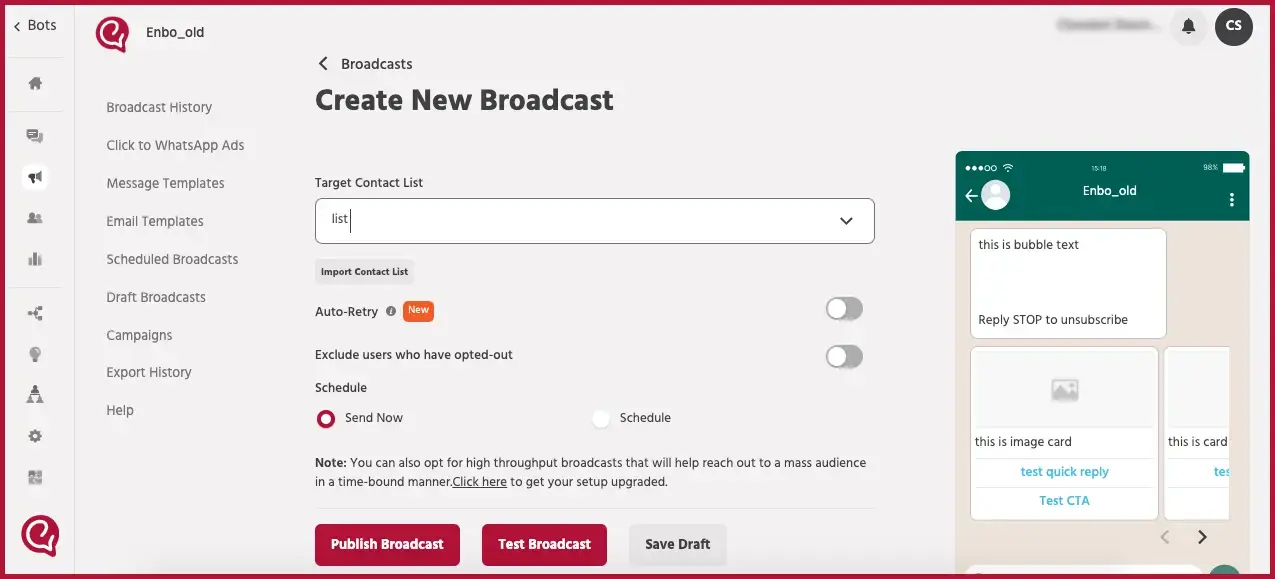
Step 3: Choose the interval you want to keep before every retry.
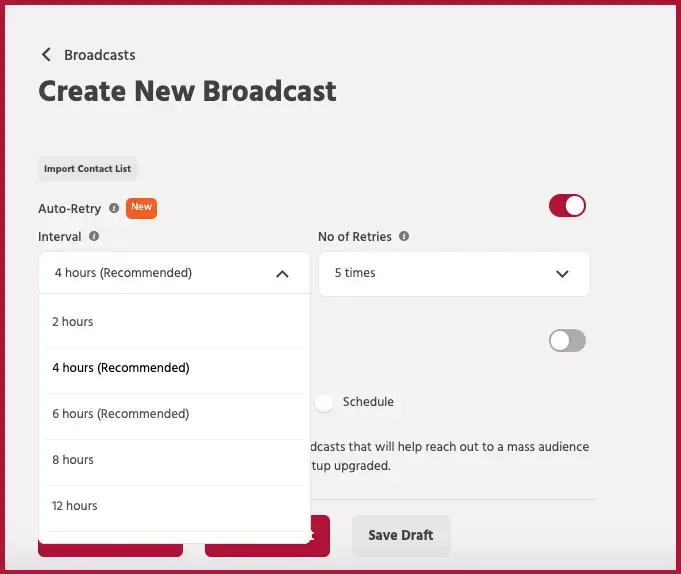
Step 4: Choose the number of retries. Best part, Engati allows you to retry upto 7 times, increasing the chances of getting your messages delivered to most of your contacts list.
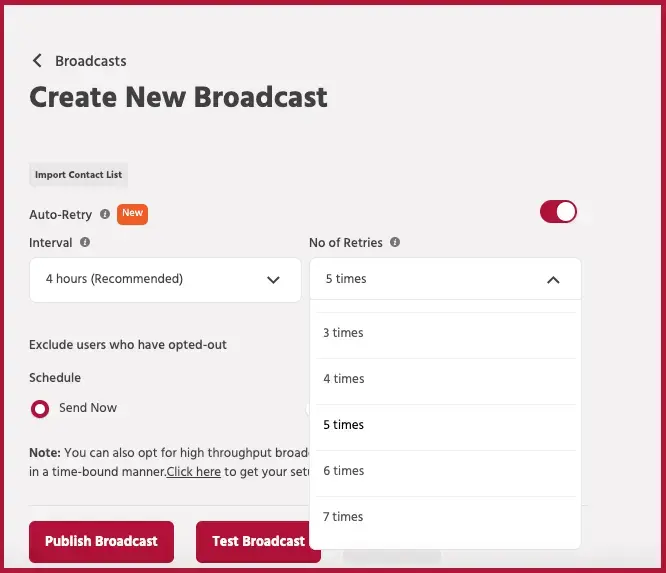
Step 5: Publish the broadcast.
See, I told you it's that easy!
👉 Recommended read: Step-by-step guide to send broadcast with Engati
One of our customers saw great results with our WhatsApp Broadcast Auto-Retry feature. Earlier their delivery rates were 60 - 70% which increased to 85%, boosting overall message reach by 15 - 25%.
Out of all the undelivered messages, 45% of them were recovered. This automated retry process helped them save time and improved their campaign success, leading to better customer engagement and stronger communication.
Apart from WhatsApp Broadcast Auto-Retry playing a major role in this, here are 3 ways you can make sure you are the least affected by Frequency Capping:
The Frequency Capping update will clearly make brands more conscious of their WhatsApp promotion campaigns. This can help improve user experience and would encourage them to engage and convert more. With the Broadcast Auto-Retry feature, you can definitely tackle this and improve your campaign performance. Increase in delivery rates directly impacts on your conversion positively, thus it is something that a business should not neglect.
By the way, if you are a business looking to build your WhatsApp marketing, Engati can help smoothen out the process for you. You can book a 10 minute session with us here.
Whatsapp Marketing
Learn how to create a WhatsApp bot in 5 minutes with easy steps. Discover WhatsApp integration tips, explore use cases & get a chatbot demo with free trail.
Whatsapp Marketing
Is your WhatsApp number banned? Learn how to deal with whatsapp ban on your account with our step-by-step guide and effective unban request templates.
Whatsapp Marketing
Discover the new WhatsApp API pricing changes, including per-message fees and free service conversations. See Engati's insights to stay ahead of the game!